
Renderings of a tool for instructional purposes without language dependency
Client: 1NV3NT LLC
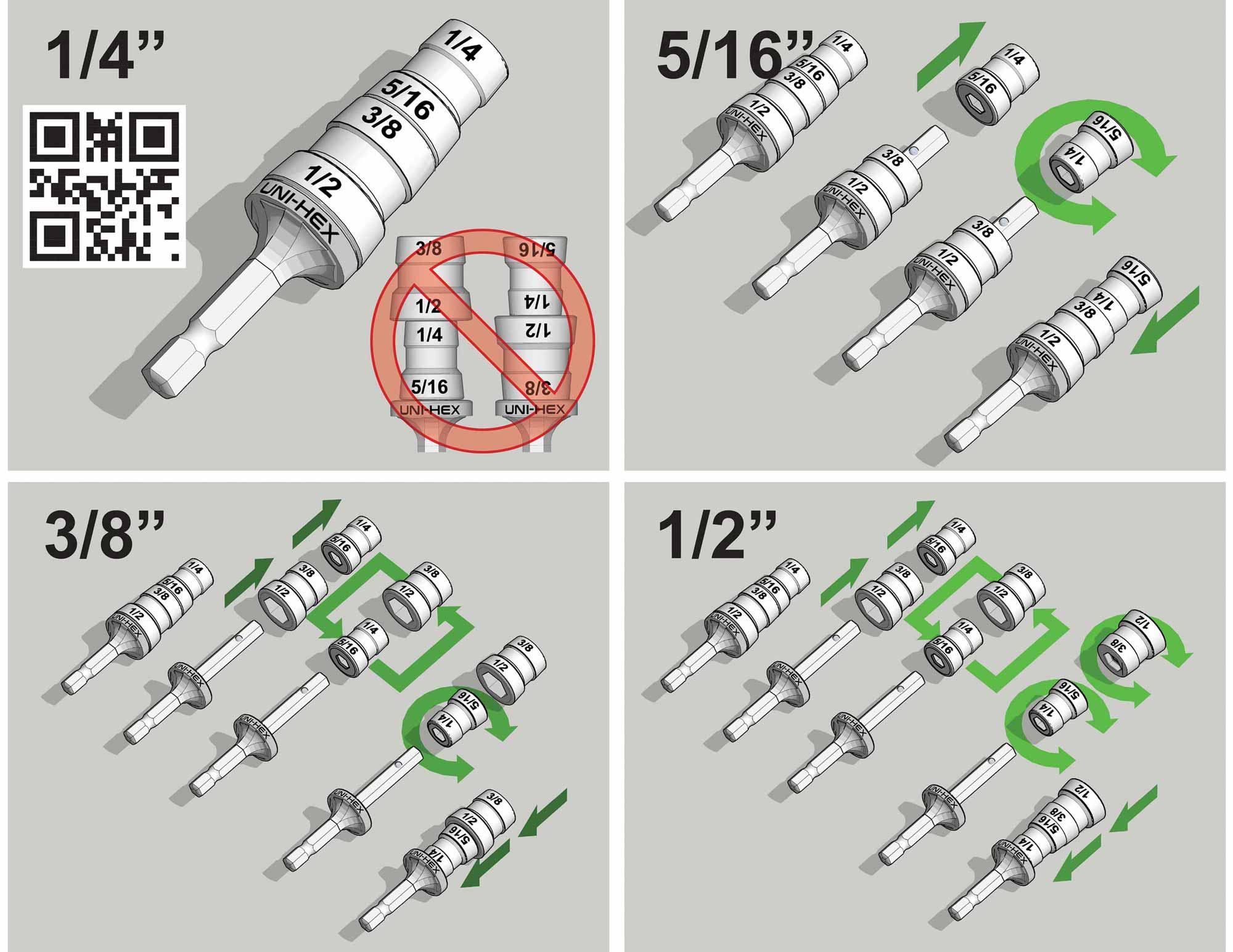
This project focused on creating a set of purely graphical renderings for instructional purposes. The primary goal was to design a visual guide that could teach someone how to use and reconfigure a tool without relying on any written text. This universal visual language allowed the product to be distributed and understood in multiple language regions, eliminating the logistical challenges and costs associated with printing lengthy, multi language instruction manuals.
The tool in question is a versatile hex head driver designed for sheet metal screws. It is an essential piece of equipment for professionals in fields like HVAC installation and metal roofing, as well as for anyone who regularly requires multiple sizes of hex drivers for a power drill. I was provided with reference images of the tool in its various possible configurations. My task was to graphically illustrate the process of transitioning from one state to another, conveying mechanical actions through imagery alone.
The tool comprises three primary components that can be assembled into four correct functional configurations (and two not functional ones). I selected the configuration in which the tool is shipped as the baseline or "origin state" for all instructions. This meant that to follow the diagrams, a user would either begin with the tool fresh from the box or first return it to this original setup. The clarity of the illustrated sequence was designed to make this reset process intuitive.
Developing a Visual Logic System
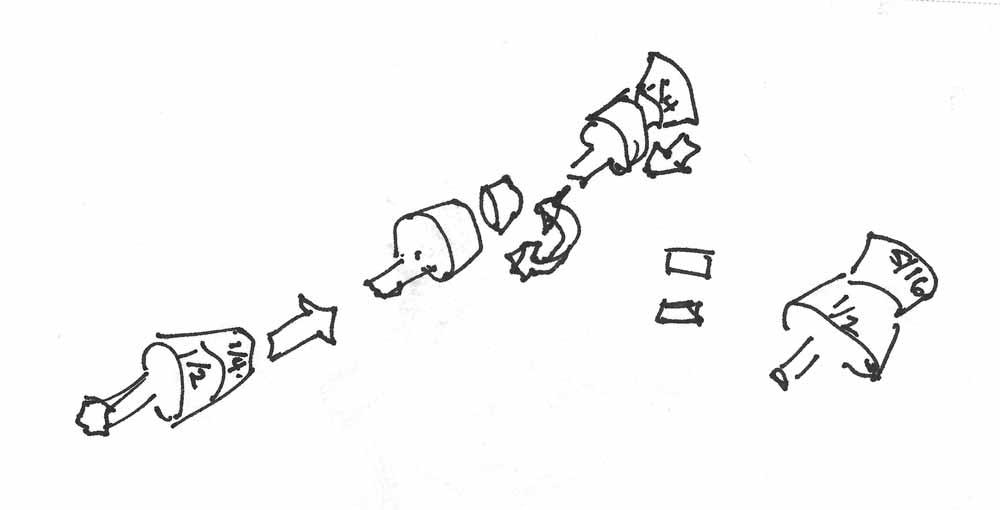
I began by working out the precise mechanical logic of each transformation in a series of rough sketches. The origin state is configured for driving 1/4" hex heads. Changing to the 5/16" configuration required three distinct actions: a linear removal, a rotation, and a linear reattachment. Achieving the 3/8" configuration involved four moves: the linear removal of two parts, a swap of their positions, a rotation of one part, and linear reattachment. The process for the 1/2" configuration also required four moves: linear removal of two parts, a swap, rotation of both parts, and reattachment.
To communicate these actions clearly, I developed a simple set of symbolic arrows. A straight arrow indicates linear motion for detachment or reattachment. A 270-degree arc with arrowheads represents a rotation. For the swap action, I used two interconnected arrows forming a squared, open box shape. While describing these symbols verbally may sound complex, their visual implementation is designed to be immediate and intuitive, translating physical actions into a clean, logical visual. The system assumes a basic mechanical aptitude, effectively filtering its audience to those comfortable with handling tools.
The Value of Visual Communication in Technical Illustration
This project exemplifies the power of technical illustration to transcend language barriers and convey complex, sequential information with efficiency and precision. It highlights a specialized application of illustration skills, where clarity and logical flow are paramount. The ability to distill mechanical processes into a universally understandable visual format is a critical component of product design, user experience, and global marketing.
This work demonstrates a different facet of my illustrative capabilities, one focused on analytical problem solving and instructional design rather than artistic representation. It underscores the breadth of applications for professional illustration, from guiding users through a product's functions to mapping out the layout of a major event.
All of the illustration work was done in Sketchup Pro. A master 3D model was made and the model was duplicated and manipulated very much like the real world tool. The model was rendered and the final labeling of the sizes was done in Adobe Illustrator.
If you would like to learn more about this product visit 1NV3NT LLC. Thanks to City Streetz Graphics for the referral.


WHAT IS SKETCHUP?:
SketchUp, originally developed by Google and now maintained by Trimble Inc., is a powerful 3D modeling program widely used across architecture, interior design, marine architecture, civil and mechanical engineering, and even film and video game production. While it is not intended for character design or organic modeling, SketchUp excels at creating precise, technical models using basic shapes, making it ideal for architectural renderings, site planning, and technical illustrations.
I first began using SketchUp in 2012 while creating the illustrated map for the St. Petersburg Power and Sailboat Show. At the time, I was seeking an efficient alternative to isometric drawing for map illustration. Since then, I have expanded its use across a variety of projects and now rely on SketchUp almost daily to create accurate, visually compelling 3D models for maps, buildings, and other technical illustrations.
SketchUp allows me to combine technical precision with artistic flexibility. Models created in SketchUp can be used as the foundation for detailed illustrations, integrated with Adobe Illustrator or Photoshop, or exported for presentation and visualization purposes. Its versatility makes it a valuable tool for projects that require accurate spatial representation, clear perspective, and a professional, polished look.
If you are interested in having a custom model or illustration created in SketchUp, please contact me for a quote. I can provide solutions for everything from complex architectural layouts to 3D maps and technical renderings tailored to your specific project needs.
EXPLORE MY WORK
- Illustration: Discover custom illustrations, book covers, illustrated maps, and architectural renderings.
- Fine Art: Browse original paintings and drawings, view the Custom Halftone Series, or check out mural projects.
- Graphic Design & Motion: See the graphic design collection, then dive into motion design and animated illustrations.
- Maps by industry: View illustrated maps tailored for boat shows, resorts, marinas, real estate, transportation, towns, parks, and wayfinding.
- More project types: Explore cover art, vehicle wraps, proposal renderings, and street art.
- Techniques & styles: Work spans vector, isometric, painting, black-and-white, GeoData, overhead maps, and halftones.
- Software expertise: Primary tools include Photoshop, Illustrator, SketchUp Pro, and InDesign, plus Premiere Pro & After Effects for motion. I am also supplementing some projects with AI.